Ecommerce Website Planning in Lucknow
Plan an ecommerce website for your Lucknow business: catalogue, mobile checkout, payments, delivery, admin workflows and a launch testing checklist.
An ecommerce website for a Lucknow business needs more than attractive product cards. Customers must understand what they are buying, know whether delivery is available, pay successfully and receive a reliable order update. Your team also needs a way to manage products, stock and payment issues without editing code.
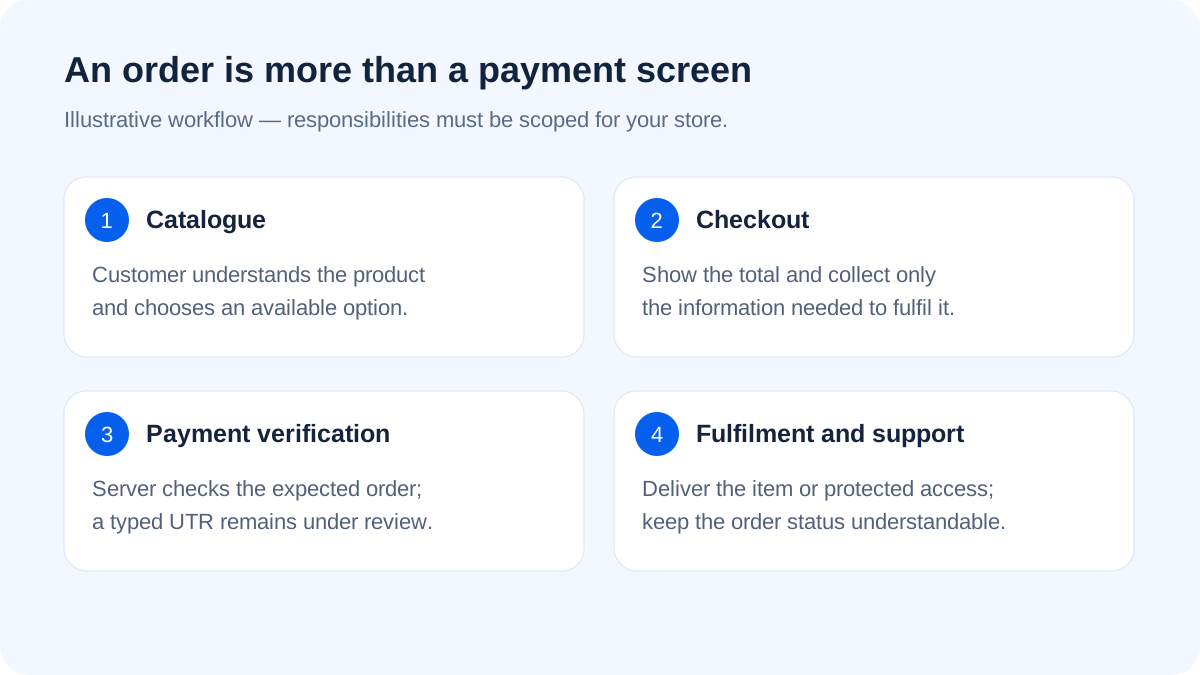
Before choosing a platform, trace one complete order from first visit to delivery or digital access. This exposes missing responsibilities much earlier than a discussion about homepage colours. This guide covers practical planning, not a promise of a particular sales result.
Decide what kind of store you are building
A boutique shipping physical products, a wholesaler taking bulk enquiries and a creator selling PDFs have different requirements. Start with one model instead of combining every possible feature in the first release.
For example, a hypothetical Hazratganj clothing seller may need size variants, product photographs and shipping rules. An ebook seller needs protected file delivery and purchase access. A PDF catalogue with a WhatsApp button may support enquiries, but it is not the same as a transactional online store.
Write a product information checklist
A customer should not have to contact you to discover basic information. Prepare consistent names, descriptions, prices, variants, availability and relevant policies. For physical goods, explain dimensions, material and what the package contains. For digital products, explain file format, included content, licence and access method.
- Photograph the actual product where possible; label illustrations clearly.
- Write useful image descriptions instead of repeating keywords.
- Show the payable price and additional charges before commitment.
- Make unavailable variants clearly unavailable.
- Explain support and the process for an incorrect or failed order.
Avoid uploading enormous photographs directly from a phone without optimisation. A small, clear product image is usually more useful than an oversized image that delays every listing.
Design the mobile checkout before the decorative sections
Try the store with one hand on a normal phone. Can a customer choose a variant, see the total, correct an address and understand the final payment step? Are error messages attached to the right field? Does the keyboard hide the button?
Ask only for information needed to fulfil the order. Requiring a long profile before showing delivery charges creates unnecessary work. If accounts are required for private digital access, explain their purpose in plain language.
Treat payment success as a server decision
A browser success screen is not enough proof that money was received. The backend should verify the provider's payment information and match it to the expected order, amount and currency. Repeated notifications should not create duplicate orders or access grants.
For manual bank or QR payments, a submitted reference should move the order into a review process. It should not automatically unlock a PDF merely because a customer typed a number. Payment credentials must remain on the server, and customers need a clear status when verification is pending.
Make delivery rules match actual operations
Document who packs orders, which locations you serve, how shipping is calculated and what happens when an item is unavailable. Do not display a citywide delivery promise that your team cannot fulfil.
For digital products, keep protected files outside the public web directory and check purchase entitlement on downloads. Include a way to recover access after login. A public PDF URL can undermine the entire paid-access workflow even if checkout itself is well designed.
Read our custom admin panel guide for the daily workflows behind products and orders.
Choose a platform by operating needs
A managed store platform can reduce some maintenance work. A self-hosted solution offers more control but requires responsibility for updates, backups and hosting. Custom development can fit specialised workflows, yet it also creates a larger testing and support commitment.
Compare total ownership rather than only development price. List subscriptions, gateway fees, extensions, hosting, content work and support separately. Ask how products, customers and orders can be exported if you move later. No platform is automatically the right answer for every business.
Prepare a realistic launch rehearsal
Use authorised test transactions or the provider's sandbox. Cover a successful payment, cancellation, duplicate callback, out-of-stock item, failed delivery calculation and an incorrect customer input. Verify the order appears correctly for both the customer and staff.
Then ask someone unfamiliar with the project to purchase a sample product without coaching. Watch where they hesitate. Fixing an unclear variant selector can matter more than adding another animated banner.
What to discuss with Appluk
Bring a sample product list, fulfilment plan, payment preference, delivery areas and required admin roles. Appluk can review the website development scope and help separate essentials from later improvements. For discovery traffic after launch, explore local SEO planning. Contact Appluk for a requirement-based discussion; this guide does not quote development or transaction fees.
Frequently asked questions
Can I start with a small catalogue?
Yes. A focused catalogue is easier to photograph, describe and test. Keep the data structure ready for additional products without building every marketplace feature immediately.
Should I offer cash on delivery?
Decide from your fulfilment capacity, order economics and ability to handle failed deliveries. Explain availability and charges clearly rather than enabling it without an operating process.
Can digital and physical products share one store?
They can, but delivery, tax handling, access and support workflows differ. Define each product type explicitly and test mixed-order behaviour if you support it.
Will changing the design increase sales?
It may improve usability, but sales also depend on product fit, pricing, trust, traffic and fulfilment. Measure completed orders and failed steps rather than assuming a visual refresh guarantees revenue.
What is a complete store backup?
It includes the database, uploaded product and private files, configuration and source, plus a tested restore process. A screenshot or frontend ZIP alone cannot recover customer purchases.
Further reading
Google image SEO guidance covers discoverable images and descriptive context. Platform guidance checked on 18 October 2026.