Website Redesign in Lucknow: Mobile & SEO Audit
Audit your Lucknow business website before redesigning: mobile layouts, page speed, forms, URL preservation, admin controls and a reversible launch plan.
A website redesign should fix a measurable problem: customers cannot understand the service, mobile enquiries fail, content is difficult to update or an old structure no longer fits the business. Replacing every colour and animation without identifying the problem can leave the expensive parts untouched.
For a Lucknow business, begin with the visitor who opens a service page on a phone. Can they understand the offer, see useful evidence and contact you without fighting the interface? This guide explains what to audit before approving a redesign.
Separate visual age from functional problems
An older-looking website may still have valuable content and useful search visibility. A modern-looking one may hide unreadable text, broken forms or poor access controls. Record actual problems before deciding which pages to replace.
Ask staff what customers repeatedly misunderstand. Check whether service descriptions match current work and whether contact information is consistent. A redesign brief should connect each change to a customer or maintenance need.
Test the most important mobile journeys
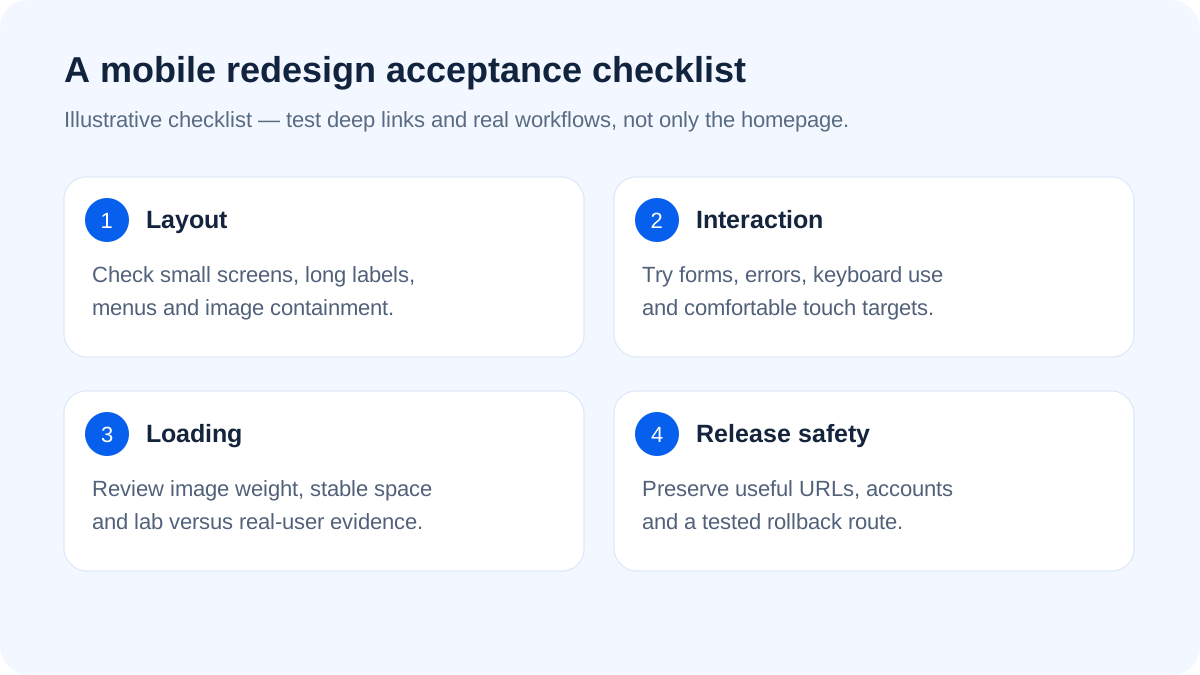
Open the homepage, a service page, portfolio and contact flow on a small screen. Try normal browsing and an imperfect connection. Look for clipped images, overlapping elements, unreachable buttons and menus that cover the content.
Do not test only the designer's phone or only the homepage. A form validation error, a long product title and a larger text setting can expose issues that a polished screenshot misses. Include keyboard navigation and reduced-motion settings in the review.
Understand speed without chasing one score
Google's Core Web Vitals focus on loading, interaction responsiveness and visual stability. Its good-experience thresholds include LCP within 2.5 seconds, INP of 200 milliseconds or less and CLS of 0.1 or less, evaluated at the 75th percentile of visits.
Those are measurement targets, not a guarantee that a site with a high lab score will rank or convert. Real visitor data and controlled lab tests answer different questions. A new or low-traffic site may not have enough field data; use lab findings to diagnose without pretending they are live-user proof.
Fix heavy assets before adding more motion
Large hero images, unnecessary scripts and unreserved image space can make a page feel slow or unstable. Deliver appropriately sized modern image files and give images explicit layout space. Keep essential text readable without waiting for a decorative animation.
Use motion to explain a state or transition, not to obstruct reading. Respect reduced-motion preferences. A loading shimmer can communicate progress, but it should not conceal a failing request or make a slow server look solved.
Preserve useful URLs and content
Before development, export an inventory of existing pages. Identify pages receiving search visits, earning relevant links or answering important customer questions. Keep useful URLs where possible; map deliberate changes to appropriate redirects.
Do not redirect every deleted article to the homepage. A missing page should have a sensible destination when one exists, and a genuine 404 when it does not. Update internal links, canonical references and the sitemap to reflect the final structure.
Treat forms and accounts as release-critical
A visually correct contact page can still fail to save or deliver an enquiry. Test invalid inputs, successful submission, duplicate taps and a server failure. Where accounts or purchases exist, preserve sessions, permissions and entitlements through the update.
Do not weaken secure cookies or CSRF checks to make a broken flow appear fixed. Investigate the actual origin, session continuity and cache behaviour. If the site sells digital products, also check that paid downloads remain private and accessible to the right account.
Review the admin experience
Can the owner update portfolio work, product covers, contact details and posts without a developer? Which edits are intentionally restricted? A redesign that improves public pages while leaving every small content change dependent on code may not solve the business's maintenance problem.
Ask for a walkthrough using real routine tasks. Separate editable content from sensitive settings such as payment credentials. Our admin panel planning guide explains how roles and workflows should be scoped.
Launch with a reversible plan
Take an actual database and file backup before deployment, not just a copy of the frontend. Test the new version on staging, preserve configuration and avoid destructive data changes. Keep previous assets long enough to support cached browser sessions where required.
After release, verify deep links, forms, analytics consent, titles, sitemap and 404 behaviour. Monitor errors and enquiries. Do not delete the old hosting copy simply because the homepage loads once.
Appluk provides website development and redesign support from Lucknow. Send the existing URL and the problems you see for a scope review. Compare proposals using the website company checklist, including migration and acceptance tests rather than only visual mockups.
Frequently asked questions
Will a redesign damage existing SEO?
It can if useful content, URLs or indexing settings change carelessly. Inventory existing pages, map changes and test redirects and metadata before release.
Does a perfect PageSpeed score guarantee rankings?
No. Performance is one aspect of site quality. Relevance, useful content and other signals still matter, and lab results do not replace real-user measurement.
Should we remove every animation to improve speed?
No. Review what each animation costs and whether it helps the task. Lightweight purposeful motion can remain, with reduced-motion support and no obstruction of content.
Can we redesign without changing the backend?
Sometimes. Determine which problems are presentation-related and which involve data or workflows. Preserve stable interfaces and test existing accounts and transactions.
What should be checked immediately after launch?
Check main pages and deep links, mobile navigation, successful forms, account flows where relevant, protected files, metadata, sitemap, 404s and private error logs.
Official reference
Google's Web Vitals overview explains the metrics, thresholds and field-versus-lab distinction. Guidance checked on 18 October 2026.